
What information will you need?
For each presenting author's paper, you will be asked to provide:
- First and last name, and email address
- Institution, current position, and country of residence (Presenting authors will be able to edit these details later)
- Individual paper title, keywords, and abstract
- Non-presenting co-authors, if applicable
IMPORTANT: You will enter presenting authors' email addresses later in the Presenting Author(s) & Chair section. Do not enter email addresses in the Paper 1, Paper 2, etc. fields.
Who is who in the submission process?
- Chair - the person chosen to chair the panel/roundtable
- Submitter - the person who physically submits the panel and/or papers through the submission system
- Presenting Author - the person who will present the paper at the conference
- Co-author - a person who contributed to the paper but will not present it at the conference
The Chair, Submitter, and Presenting Author may be the same person or different people, depending on how the panel is organised.
Please check the names, roles, and email addresses carefully to avoid confusion in future conference communication.
STEP-BY-STEP GUIDE
STEP 1. Enter the papers
The form allows you to submit up to five papers within the panel. The lowest number of papers in a panel submission is 3. The system will not allow a submission with fewer than 3 papers.
For each paper, complete the relevant fields:
Name Surname, Institution; Paper title; Keywords; Abstract
The same structure applies to Papers 2–5.
IMPORTANT!
Each text box has a 300-word limit.
Do not enter the presenting author's email address in this step.
If your panel has fewer than five papers, simply leave the remaining paper sections empty.
For example:
Jane Smith, University of Lund
Remembering the Past: Memory and Identity
Keywords: memory, identity, history
Abstract: [abstract text]
STEP 2. Indicate whether this is a Working/Regional Group submission
Select:
Yes - if the submission is being made on behalf of an MSA Working/Regional Group.
No - for all other submissions.
STEP 3. Add non-presenting co-authors
The Co-authors (not presenting) field is only for people who:
contributed to a paper,
will not present at the conference, but
should be listed as co-authors in the conference programme.
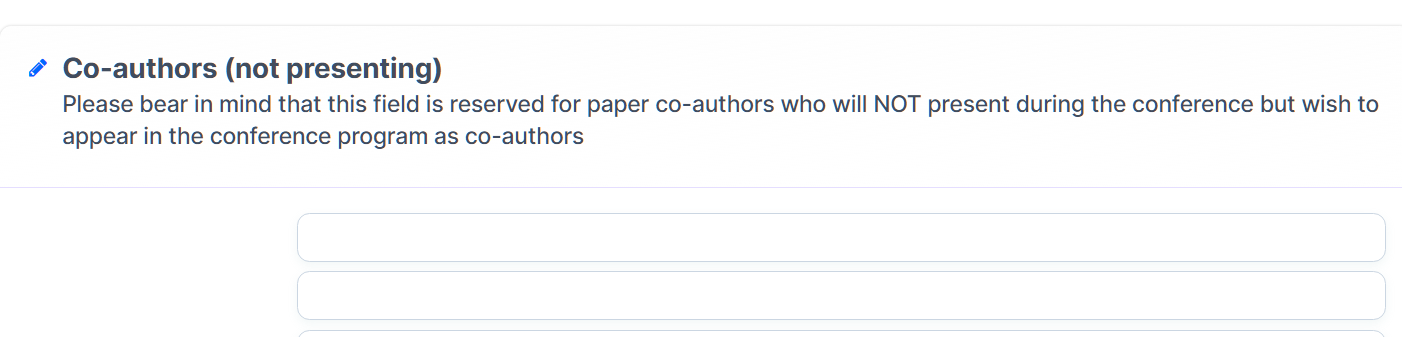
Do not add presenting authors here! Presenting authors will be added in a separate section later.
STEP 4. Enter the Chair
Enter the name of the person who will chair the panel.
STEP 5. Add the Presenting Authors
This is the most important part of the form.
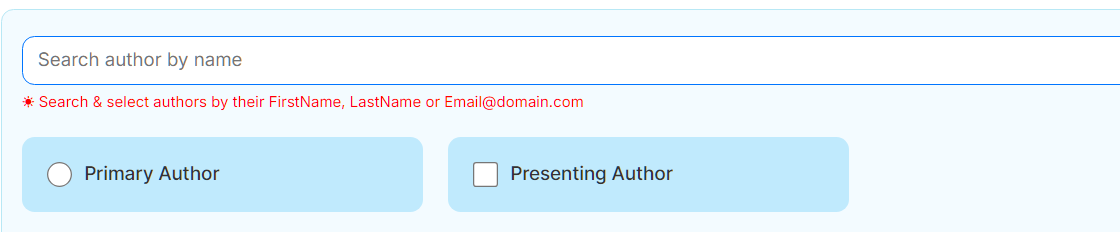
Under Presenting Author(s) & Chair, add all people who will actually present a paper at the conference.
Click:

For each presenting author, enter:
First Name
Last Name
Email
Institution
Current Position
Country of Residence
Whether they need a visa to enter Sweden
IMPORTANT!
When adding the presenting authors, please check whether that person already has a profile! They may already be part of a different submission, and this way we avoid creating a second profile of the same person:

If an author is not marked as either Chair or Presenting Author, they will automatically be assigned the role of Non-Presenting Author.
Non-Presenting Authors will appear as part of the submission and may be listed as co-authors in the conference programme, but they will not be able to complete full conference registration as presenting participants.
STEP 6. Check the author order
Use the  button to make sure the authors are listed in the same order as their papers.
For example:
Paper 1 → Jane Smith
Paper 2 → John Brown
Paper 3 → Maria Garcia
The presenting authors should therefore appear in the corresponding order.
STEP 7. Understand the account creation
Important: Adding a person as a Presenting Author/Chair creates an account for them automatically.
Once you submit the abstract:
the Chair and presenting authors will receive a Welcome Email;
the email will contain instructions for accessing their account and setting their password;
they will be able to log in and update their profile.
Please make sure that all email addresses are correct, active, and regularly checked.
Do not use someone else's email address or a shared email address unless they will actually have access to it.
STEP 8. If you are submitting on someone else's behalf
If you are completing the form but you are not an author or presenting author yourself, select:

You can then submit the information on behalf of the authors.
STEP 9. Final check before submitting
Before clicking Submit, check that:
Papers
☐ Every paper has the correct name, institution, title, keywords, and abstract
☐ No email addresses have been entered in the paper fields
☐ All abstracts and other text are within the 300-word limit (otherwise the text will be automatically cut).
Authors
☐ All presenting authors have been added in the Presenting Author section
☐ Non-presenting co-authors have been entered separately
☐ The Chair has been correctly identified
☐ Presenting authors are in the correct order
Contact details
☐ All presenting authors' email addresses are correct
☐ Institutions and positions are correct
☐ Countries of residence are correct
☐ Visa requirements have been indicated correctly
Submission
☐ You have checked all information carefully
☐ You are ready to submit the final version